Home internet Archives - Ooredoo Oman

FTTH Troubleshooting guides - Ooredoo Oman

FTTH Troubleshooting guides

Ooredoo Oman

Search

What are you looking for today?

Home internet FAQ

Your questions answered

FTTH Troubleshooting guides
1.The Super Fibre connection is not working, what should I do?

  • Call 1500 to check if your account is Active, not barred and there are no billing issues.
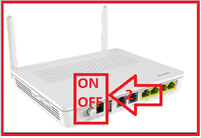
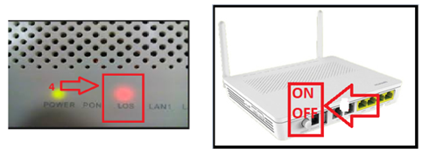
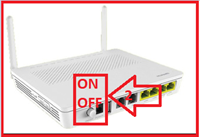
  • Check if power adapter is properly plugged in and the modem is powered up.

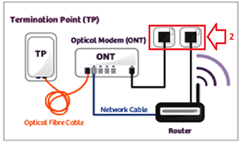
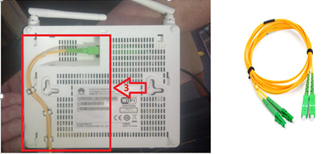
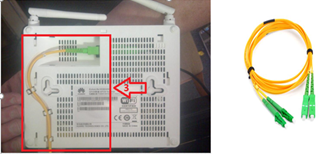
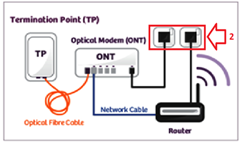
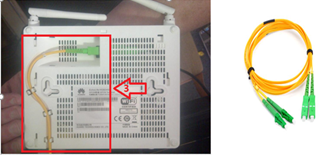
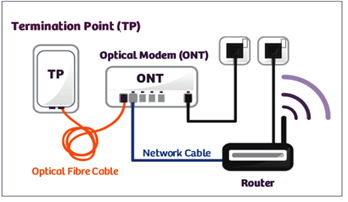
  • Check if the Optical Cable (Yellow cable) connected properly on the modem (Optical Port).

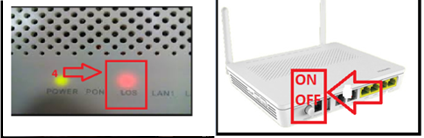
  • If LOS (Red light) is ON in the modem, then check cables, restart the modem.

  • If issue persists, then call 1514 to create a Trouble Ticket.
    Note: Do not reset the modem (ONT).

2.The Superfast connection is very slow, what should I do?

  • Call 1500 to check if your account is Active, not barred, and no billing issue.
  • Restart the Modem.

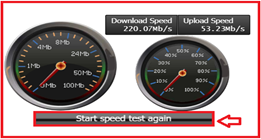
  • check speed test from Click
    Note :Acceptable speed of Superfast Home Broadband is 80% of the applied speed.
    For Example: If customer has 100 mbps plan, normal speed (70 to 100 mbps) not less than 70 MBPS.

  • If issue persists, then call 1514 to create a Trouble Ticket.
    Note: Do not reset the modem (ONT).

3. The Superfast Voice is not working, what should I do?

  • Call 1500 to check if your account is Active, not barred, and no billing issue.
  • Check if power adapter is properly plugged in and the modem is powered up.

  • Check if the Optical Cable (Yellow cable) connected properly on the modem (Optical Port).

  • If LOS (Red light) is ON in the modem, then check cables, restart the modem.

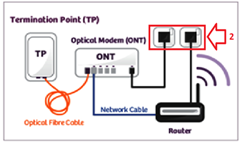
  • Check if telephone cable is connected to TEL 1 port of the Modem (Port Tel 2 is disabled).
  • Change the Handset Device.
    Note: Please don't reset the Modem..
  • Change the Telephone Cable.
  • If issue still persists, then call 1514 to create a Trouble Ticket.

4. The Super Fibre is disconnecting, what should I do?

  • Restart the device.

  • Check if the disconnection is related to the device itself (signals up and down). Or only WIFI.
  • Check if power adapter is properly plugged in and the modem is powered up.

  • Check if the optical cable (yellow cable) connected properly on the modem (optical port).

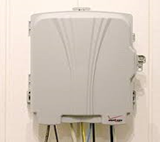
  • Check if the optical cable (yellow cable) connected properly with the tab (fiber access terminal box) which is mounted on the wall.

  • If issue persists, then call 1514 to create a Trouble Ticket
    Note: Do not reset the modem (ONT).

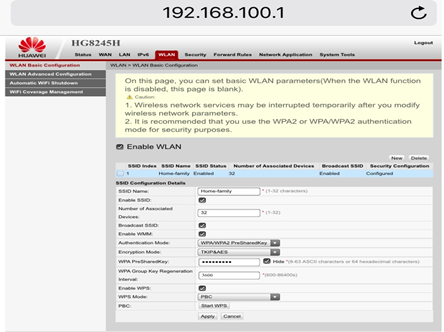
5. How to change the Super Fibre WiFi password for the Huawei Modem (HG8245H)?

  • Login to the IP Address: IP:192.168.100.1
  • Press on "WLAN" , then "WLAN Basic Configuration" and then "WPA PresharedKey".
  • Insert the password you would like.
  • .Enable WPS.

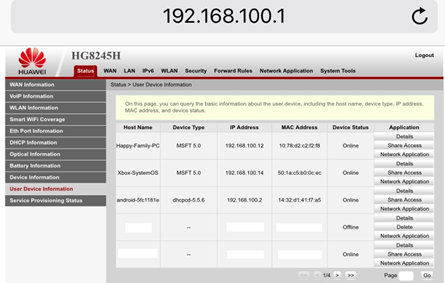
6. How can we view the devices connected to the Super Fibre WiFi?

  • Login to the IP Address: IP:192.168.100.1
  • Press on "Status" and then press on "User Device Information".
  • Note: You can delete any devices you would like by pressing on " Delete".

7. Safety Instructions :

  • Do not look directly into the optical port without eye protection.

  • Keep the device out of the reach of children as the components or accessories may be swallowed. (Dangerous Optical cable)
  • You can also contact us through our social media channels 24/7 (Twitter, Facebook, Instagram) for faster assistance.
    For any further help, kindly contact us by Calling 1500 or +968-95011500 if you are abroad. Need our assistance? Contact us

Home Broadband
How to change your USSD (contact) number?

  • 1500 contact center:Contact the call centre 1500 & request for changing the contact number.
  • Ooredoo Outlet: Visit the nearest Ooredoo store. You can find our store locations online here Click Here
  • My Account: Visit the webpage: http://www.myaccount.om and select "Account Profile"and then select " change USSD contact Number".

How to check and pay your bill ?

  • Ooredoo Oman App: under the "Local"Tab, you will get the "Total Outstanding". To pay your bill, click on "Pay Now".
  • My Account:under the Payments section: Click Here
  • Self-service machines at:Click Here
  • 1500 self-service:you can check your bill by calling 1500 customer care and follow the instructions.

How to subscribe to a plan or renew subscriptions for prepaid Home Broadband?

m

  • Ooredoo Oman App: underthe "Manage my plan" tab, click on"let's Go" and then "Add a New Plan".
  • MyAccount: under Fixed Plans then “change data plan” Click Here
  • USSD Menu: by dialling *161# and following the instructions

How to check your data balance for fixed line postpaid accounts?

  • Ooredoo Oman App:under "Data Products".
  • MyAccount: under Fixed Plans then "check data balance" on the link Click Here
  • Ooredoo Oman App:On the front page.

How to get extra data?

  • Ooredoo Oman App:under "Manage My Plan", click on "Let's Go" and then "Add a New Plan".
  • MyAccount: under Fixed Plans then "purchase more data" Click Here
  • USSD Menu: by dialling *161# and following the instructions.

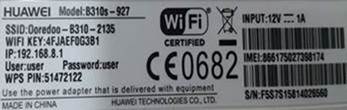
How to get your modem username & password?

You can get the username & password from the bottom of the LTE Modem, as shown below:

How to disable your internet access?
My Account: under Fixed Plans then Manage Internet Access: http://www.myaccount.om

Now you can chat with us through Ooredoo WhatsApp and get more information about our services To start chatting please press the link below: https://ooredoo.om/Whatsapp

Ooredoo Always available for you,

Get It in touch with us